



























Babel Icon

Babel v1.10.8

Chrome Extension (Manifest V3) • AI Productivity • 2026

Instant in-place AI translation and platform-specific prompt engineering directly inside any browser input field with a single keystroke. Zero popups, zero copy-pasting, zero friction.

EN English EN DE Deutsch DE FR Français FR ES Español ES IT Italiano IT PT Português PT NL Nederlands NL PL Polski PL UK Українська UK JA 日本語 JA ZH 简体中文 ZH AZ Azərbaycanca AZ BE Беларуская BE KK Қазақша KK UZ O'zbekcha UZ KA ქართული KA HY Հайերեն HY KY Кыргызча KY TG Тоҷикӣ TG LT Lietuvių LT LV Latviešu LV ET Eesti ET RU Русский RU
Multi-Platform Ecosystem Roadmap

Launching Soon Across Browsers, Desktop & Mobile

Babel is expanding into a universal zero-friction translation layer with 1-click browser extensions, standalone native desktop apps, and mobile custom input keyboards.

Google Chrome
● Available Now ↗
Chrome Web Store
Official Release · Install 1-Click
Brave Browser
● Available Now ↗
Brave Browser
Shields · Install 1-Click
Arc Browser
● Available Now ↗
Arc Browser
Arc Spaces · Install 1-Click
Microsoft Edge
● In Review
Edge Add-ons
Microsoft Edge · Store Review
Opera
● In Review
Opera Addons
Opera Browser · Store Review
Opera GX
● In Review
Opera GX Store
Opera GX · Store Review

While our core energy today is laser-focused on perfecting the browser extension experience, standalone native desktop apps and custom mobile keyboards are on our research roadmap - bringing system-wide in-place translation across all your devices.

Windows
In Concept
Windows Desktop
Windows 11 / 10 · Global Injection
macOS
In Concept
macOS Desktop
Apple Silicon · System-Wide Bar
iOS
In Concept
iOS & iPadOS
Custom Keyboard · App Store
Android
In Concept
Android Keyboard
IME Input Method · Google Play
Manifest V3 Architecture
Chromium 112+ Engine Compatibility
Zero-Config In-Place Typing
Client-Side Privacy & DLP

Core Architecture & Capabilities

Designed to eliminate friction entirely. Babel turns your native keyboard thoughts into fluent communication without ever breaking flow state.

01 / Compatibility

Universal Input Field Adaptation

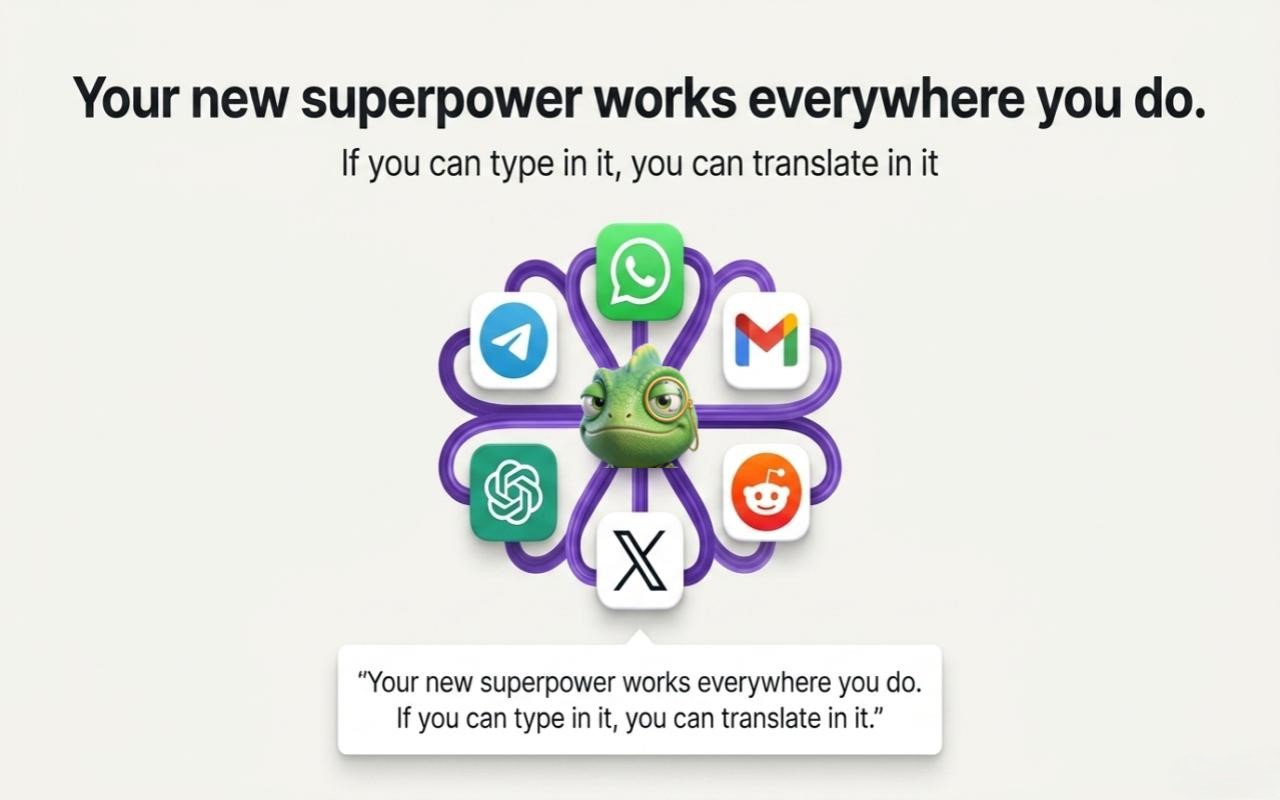
Universally adaptive across any modern web interface. Seamlessly integrates with standard inputs, multi-line textareas, rich-text editors, contenteditable containers, messengers, and single-page applications without disrupting focus, layout, or virtual state.

02 / Tone Control

6 Dynamic Tones & Rapid Cycling

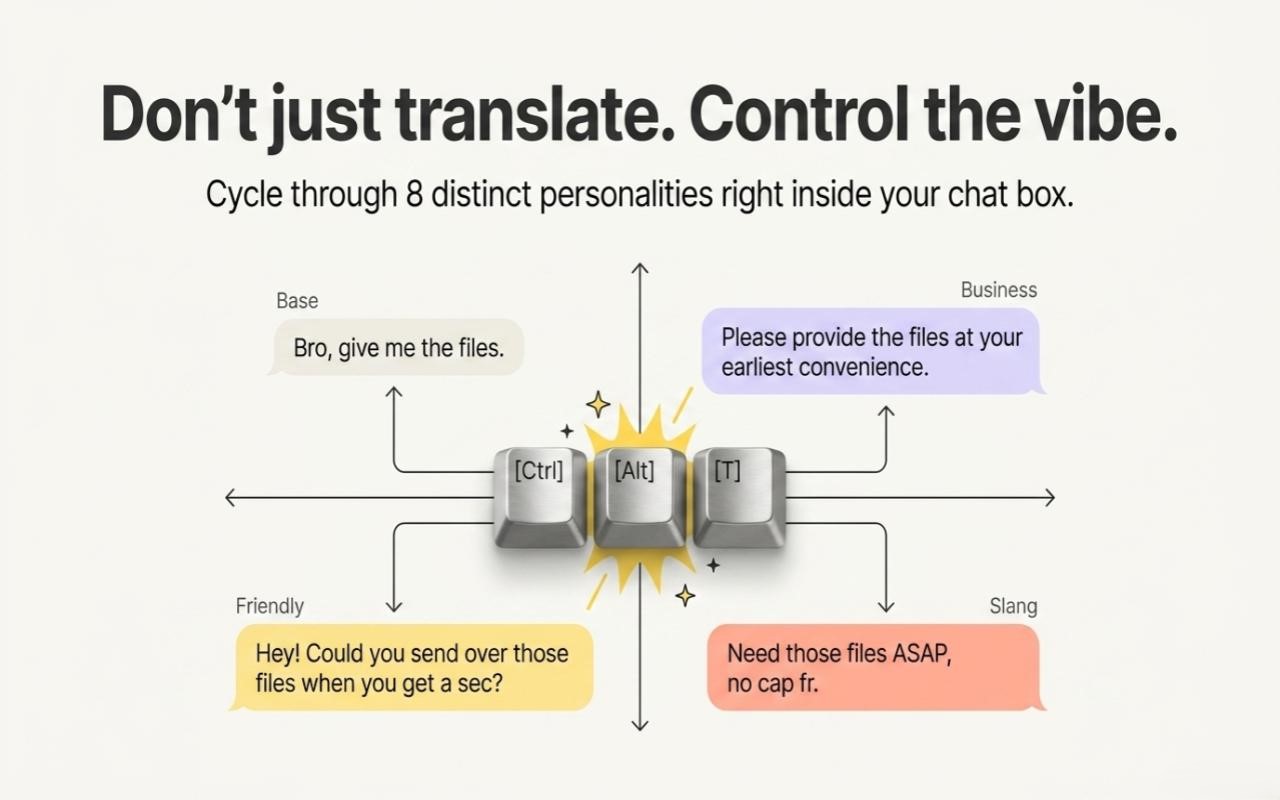
Toggle between Natural, Friendly, Slang (gonna, tbh, fr), Business, Brief, and Vivid. Use Ctrl+Alt+T to cycle styles instantly for any single translation without opening settings.

03 / AI Prompts
Beta

AI Prompt Engineering Mode

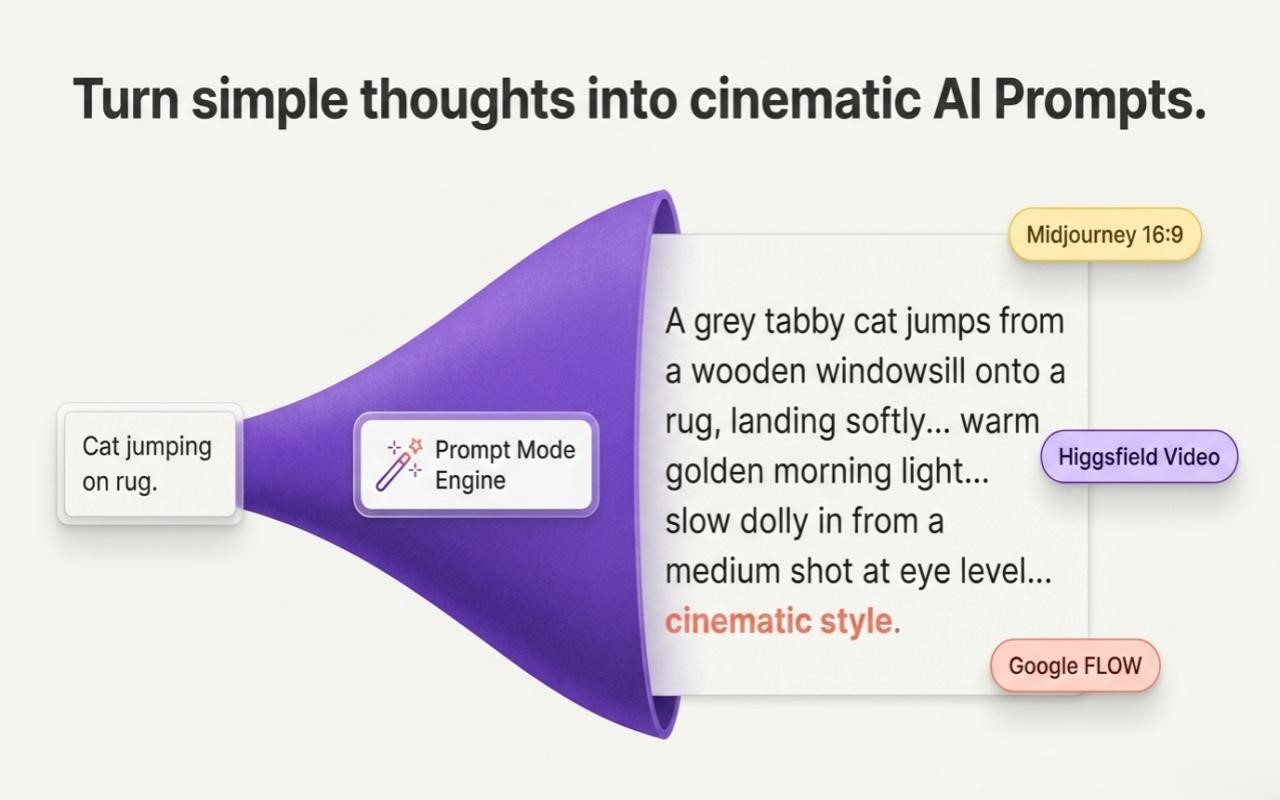
Transform rough descriptions into platform-optimized prompts for Midjourney, Higgsfield, Google Flow, and Flux. Automatically formats lighting, composition, perspective, camera lenses, and aspect ratio parameters. (Currently in public Beta · actively evolving).

04 / Privacy & DLP

Client-Side DLP Protection

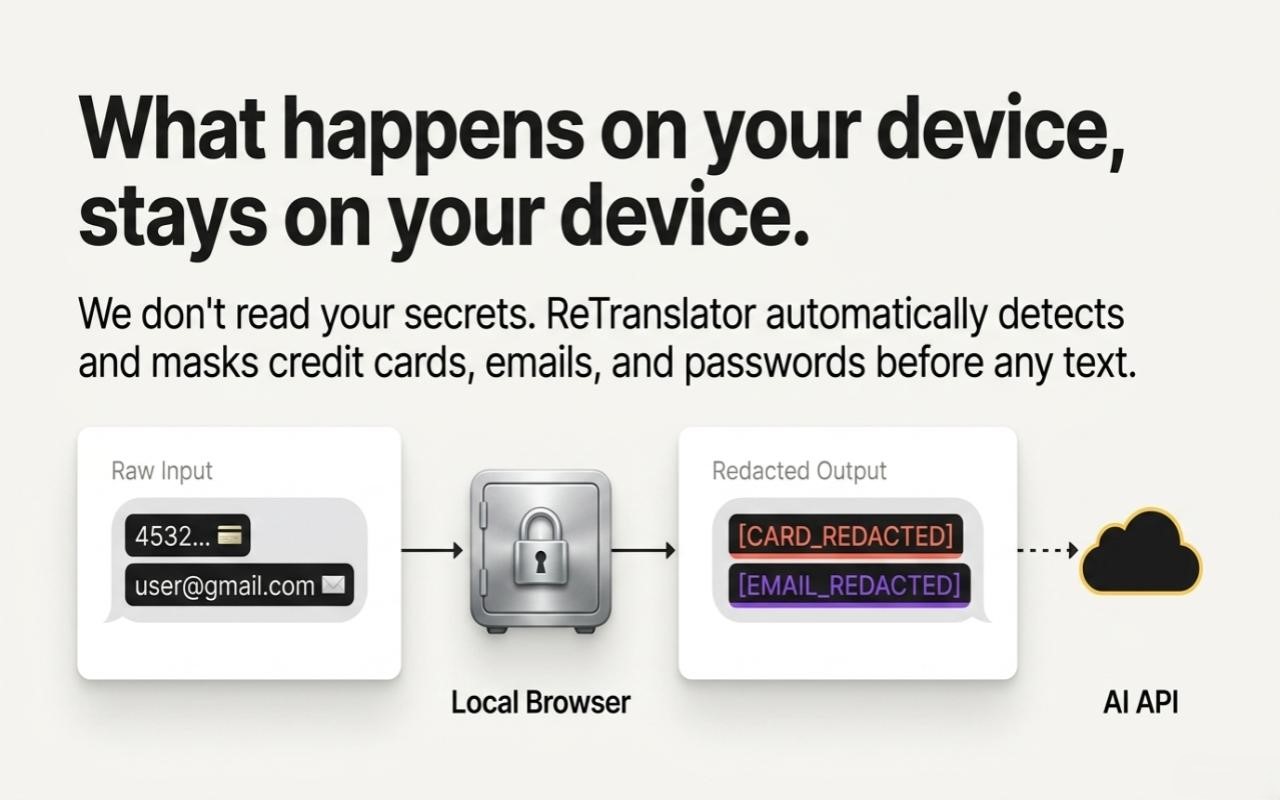
Built-in Data Loss Prevention (DLP) regex engine safeguards against accidental leaks. Automatically detects and blocks or redacts API keys (sk-..., ghp_...), JWTs, passwords, credit card numbers, and PII before dispatch.

05 / Architecture

Manifest V3 Service Worker

Built for modern Chrome Manifest V3. Requests are executed through background service workers to bypass webpage CORS restrictions, while AI provider credentials stay on the Babel backend, never in the browser.

06 / Localization

23 Localized UI Dictionaries

Complete multi-lingual UI coverage across 23 international language dictionaries with instant hotkey target-language cycling via Ctrl+Alt+L.

23 Localized Interface Dictionaries

Built-in native language translations with dynamic hotkey cycling (Ctrl+Alt+L).

23 Languages Supported
EN English EN
DE German DE
FR French FR
ES Spanish ES
JA Japanese JA
ZH Chinese ZH
UK Ukrainian UK
PT Portuguese PT
IT Italian IT
PL Polish PL
NL Dutch NL
BE Belarusian BE
KK Kazakh KK
UZ Uzbek UZ
KA Georgian KA
HY Armenian HY
AZ Azerbaijani AZ
KY Kyrgyz KY
TG Tajik TG
LT Lithuanian LT
LV Latvian LV
ET Estonian ET
RU Russian RU

Context-Aware AI Prompt Engineering

🧪 Beta · In Active Development Auto-Detection Active

Babel intelligently understands when you are typing inside a generative AI workspace. Instead of performing literal translation, the extension automatically inspects the active platform, extracts your core conceptual intent, and synthesizes a production-grade, syntactically compliant master prompt tailored to that studio's specific diffusion or video mechanics.

🧪
Beta Feature Notice: AI Prompt Engineering Mode is currently in public beta and under active evolution. Generation rules, syntax modifiers, camera/lighting heuristics, and supported studio targets are rapidly expanding and refined based on creator workflows and user feedback.
STEP 01

Host Studio Detection

The content engine checks location.hostname and DOM container classes (Discord, Higgsfield studio, Google Flow, Civitai) to automatically engage platform-specific prompt schemas.

STEP 02

Rule-Based Assembly

Enriches visual descriptions with lighting tokens, camera perspectives, film stock tags, motion dynamics, aspect ratios, and negative prompt boundaries conforming to model architecture.

STEP 03

Zero-Friction Injection

A single press of Alt + T replaces your rough natural thought directly in the generator input field, ready to be dispatched with Enter.

Initially Integrated Generation Platforms

Specialized prompt syntaxes pre-configured out-of-the-box:

🎨 Midjourney Text-to-Image

Formats multi-weighted subject descriptions, composition angles, cinematic rendering engines, and appends parameter flags.

/imagine prompt: --ar 16:9 --v 6.0 --stylize 250
🎬 Higgsfield AI AI Video Studio

Synthesizes temporal consistency cues, character persistence directions, camera travel speed, and transition pacing.

motion: dynamic camera: orbit fps: 60 cinematic lighting
🌊 Google FLOW Video & Motion

Generates continuous shot choreography, realistic physics descriptions, environmental ambient acoustics, and high-fidelity video cues.

shot: dolly forward 4k photorealism volumetric smoke
⚡ Flux & Civitai Diffusion Models

Optimizes trigger tokens, LoRA weight notations, fine-grained anatomy modifiers, and negative prompt filtering.

<lora:detail:0.8> masterpiece, 8k negative prompt
🌐 Universal Engine Universal Fallback

Standardized high-yield prompt formatting applicable to ChatGPT, Claude 3.5 Sonnet, DALL-E 3, Stable Diffusion WebUI, and custom studios.

structured intent concise grammar editorial quality
🚀 Continuously Expanding Platform Ecosystem (Beta): Native integrations for Runway Gen-3, Luma Dream Machine, Sora, and Kling AI are actively rolling out, with prompt heuristic models continuously being trained and refined.
Beta Evolution

Plans & Service Tiers

Babel operates on a transparent capacity-tier model with dedicated backend infrastructure, high-concurrency translation quotas, and instant on-demand capacity boosts. Secure checkout available via Lava.top and Gumroad with instant automated license delivery.

Baseline

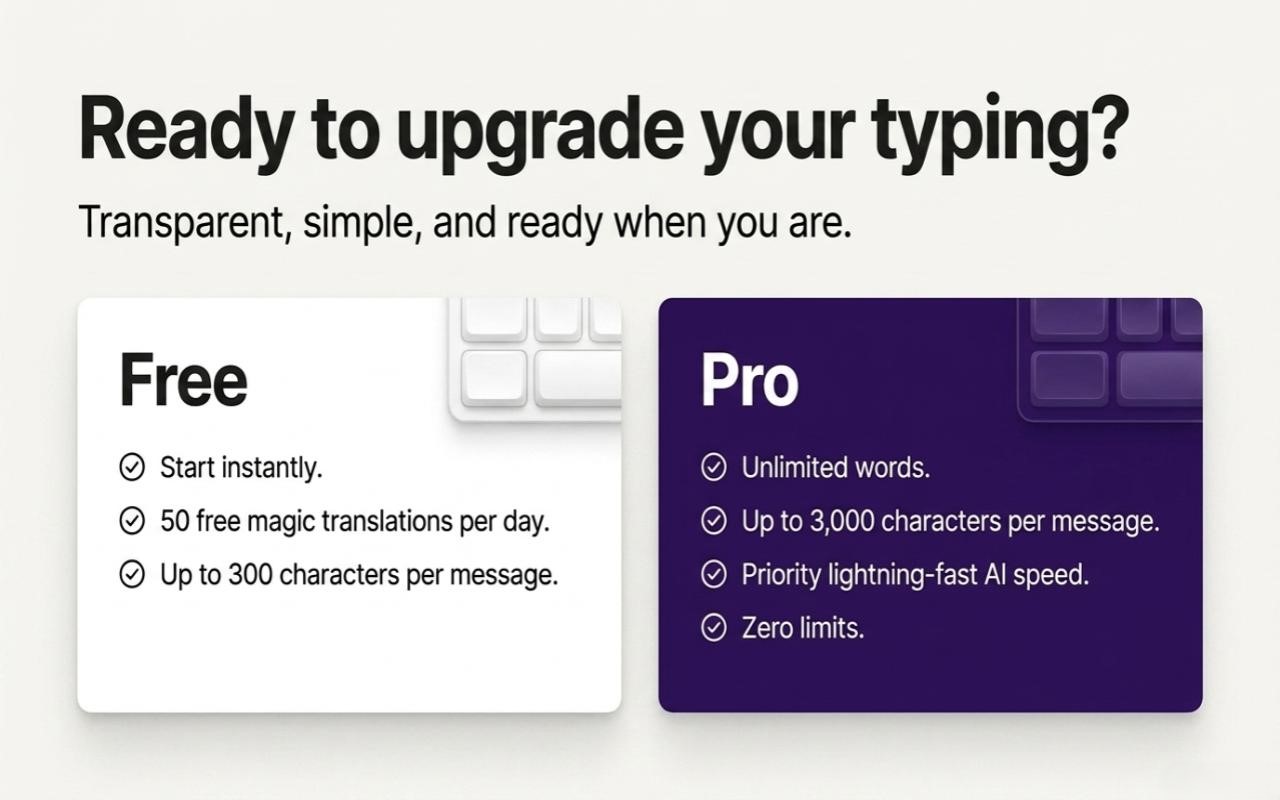
Free

$0/forever

Essential in-place translation for everyday web browsing.

Daily Allowance 20 units
Max Length 300 chars
Cost per Alt+T 1 unit
Account Setup Zero-config
  • 20 units daily allowance
  • Standard in-place translation
  • All 23 target languages
  • Basic modes (No Prompt Mode)
Install Free ↗

Monthly

$5.00/month

A solid daily allowance for everyday translating.

1 month $5.00
  • 200 translations per day
  • Prompt Mode
  • All 23 target languages
  • Style presets
Upgrade ↗

On-Demand Boost Packs

Instant top-up units to keep translating uninterrupted whenever daily limits are reached.

One-Time Purchase
⚡ +100 Units Boost 100 Instant 100 translation units top-up for active sprints
🔥 +1,000 Units Boost 1000 High-demand 1,000 translation units bundle
🚀 +3,000 Units Boost 3000 Maximum capacity 3,000 translation units package
Unit Consumption Reference
Standard Translation 1 Unit
Long Text (>300 chars) 2 Units
AI Prompt Mode (Beta) 3 Units
Base64 Local Encode 0 Units (Free)

User Guide & Frequently Asked Questions

📖 Interactive Handbook

The definitive reference for interacting with Babel. Master keyboard gestures, floating mascot management, radial HUD navigation, proofreading mechanics, text tokenization, and troubleshooting.

⌨️ 1. Core Hotkeys & Daily Gestures 5 Guides
🎯 What is the full default hotkey mapping in Babel?

Babel is engineered around keyboard-first, zero-friction interaction. All hotkeys are registered using physical hardware key codes (KeyboardEvent.code), meaning they work identically regardless of whether your operating system keyboard layout is currently English, Russian, Ukrainian, German, or any other language:

Shortcut Action Name Functionality
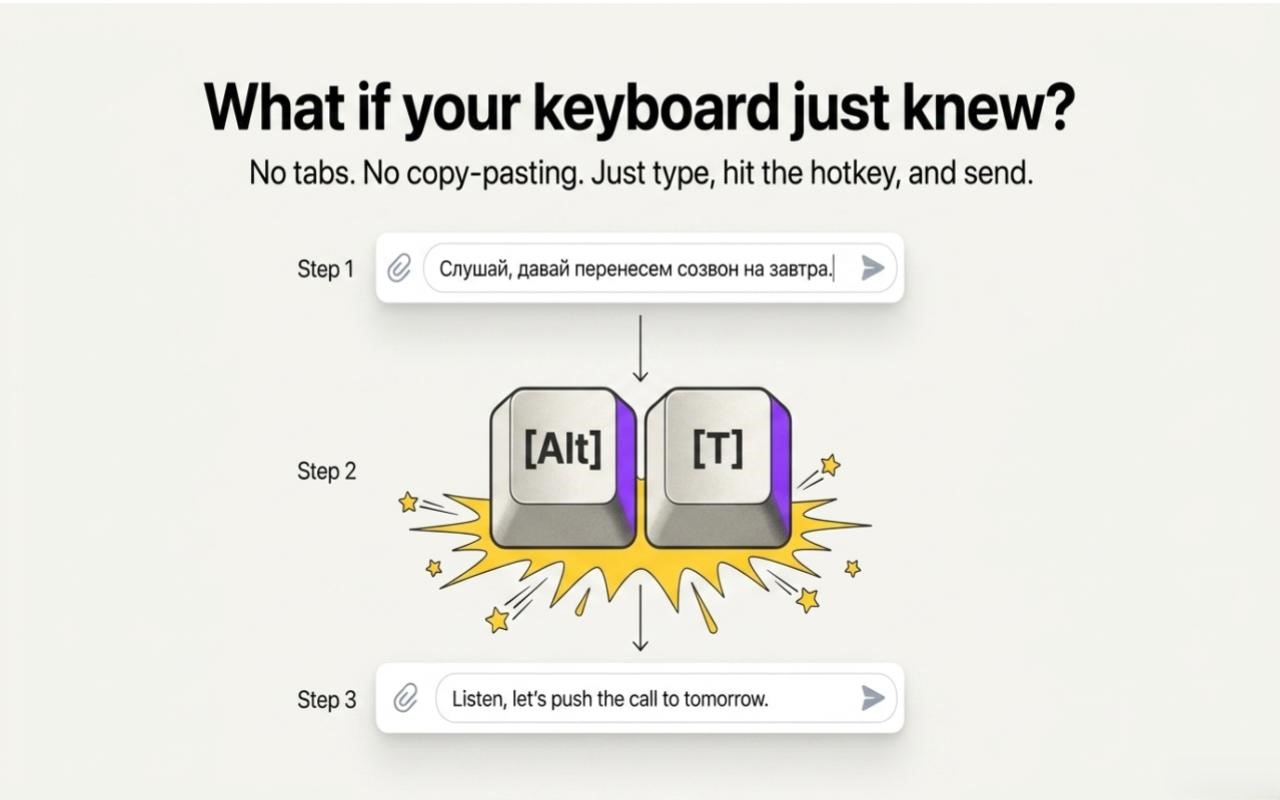
Alt + T In-Place Translation Instant sub-300ms translation inside active input field or textarea.
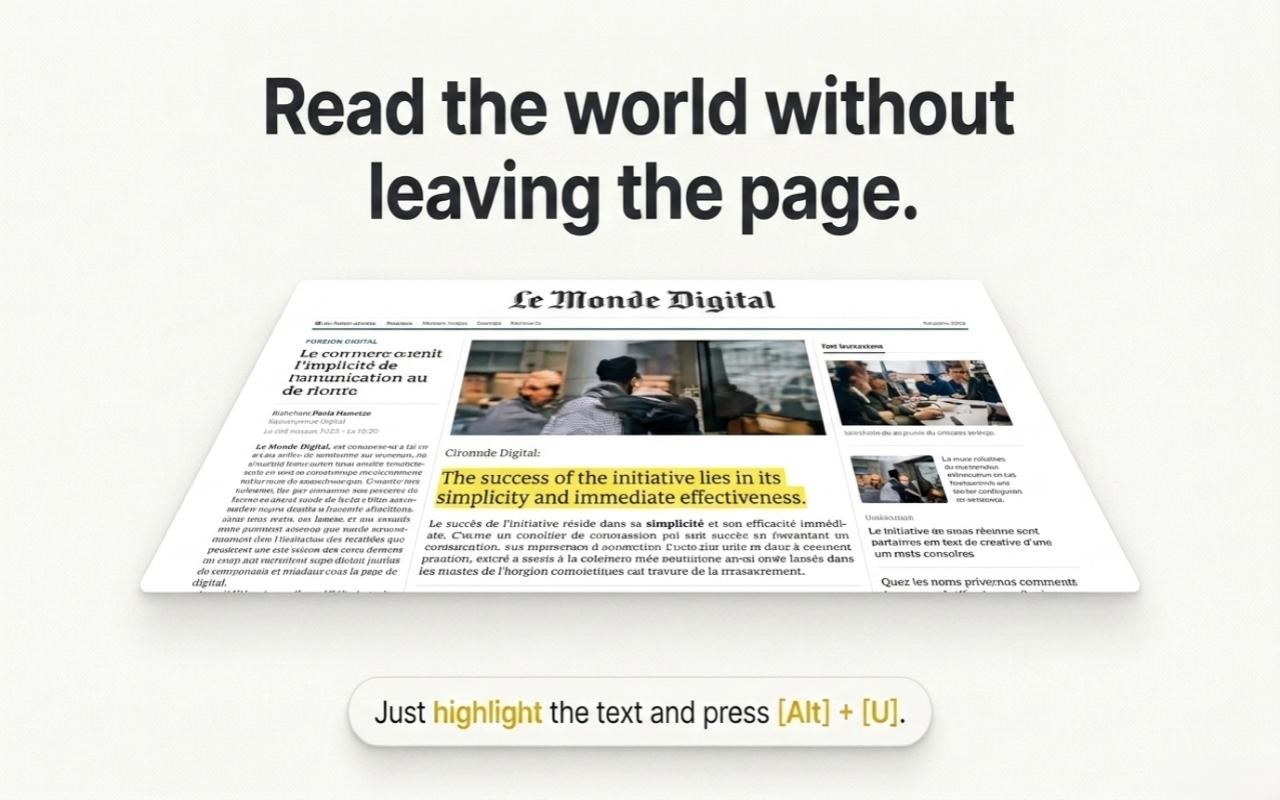
Alt + U Selection Translation Translates highlighted text anywhere on any webpage (including Shadow DOM) in-place.
Alt + P Grammar Proofreading Polishes spelling, syntax, punctuation, and flow on the same language without translating.
Alt + Q / Alt + W Language HUD Ring Rotates outer Cyan HUD ring counter-clockwise ↶ / clockwise ↷ to pick target language.
Alt + A / Alt + S Tone HUD Ring Rotates inner Magenta HUD ring counter-clockwise ↶ / clockwise ↷ to pick conversation tone.
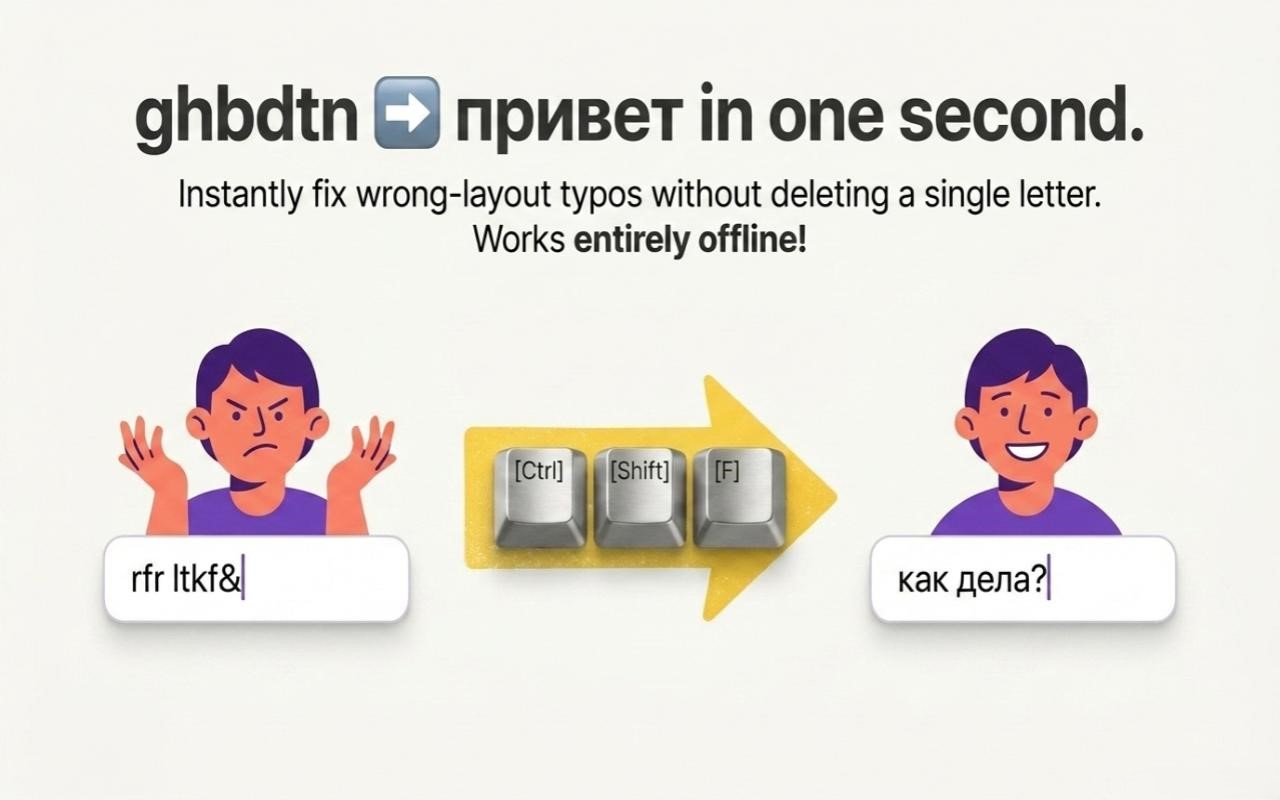
Ctrl + Shift + F Layout Typo Fixer Instantly fixes text typed in the wrong layout (e.g. ghbdtnпривет) 100% offline.
Escape Dismiss / Revert Closes the radial HUD menu immediately, or reverts temporary selection translations.
💡 Pro Tip: Hotkeys work uniformly across all keyboard layouts. For instance, Alt + T triggers smoothly whether pressed as English Alt+T or Russian Alt+Е.
How does In-Place Translation (Alt + T) work inside active input fields?

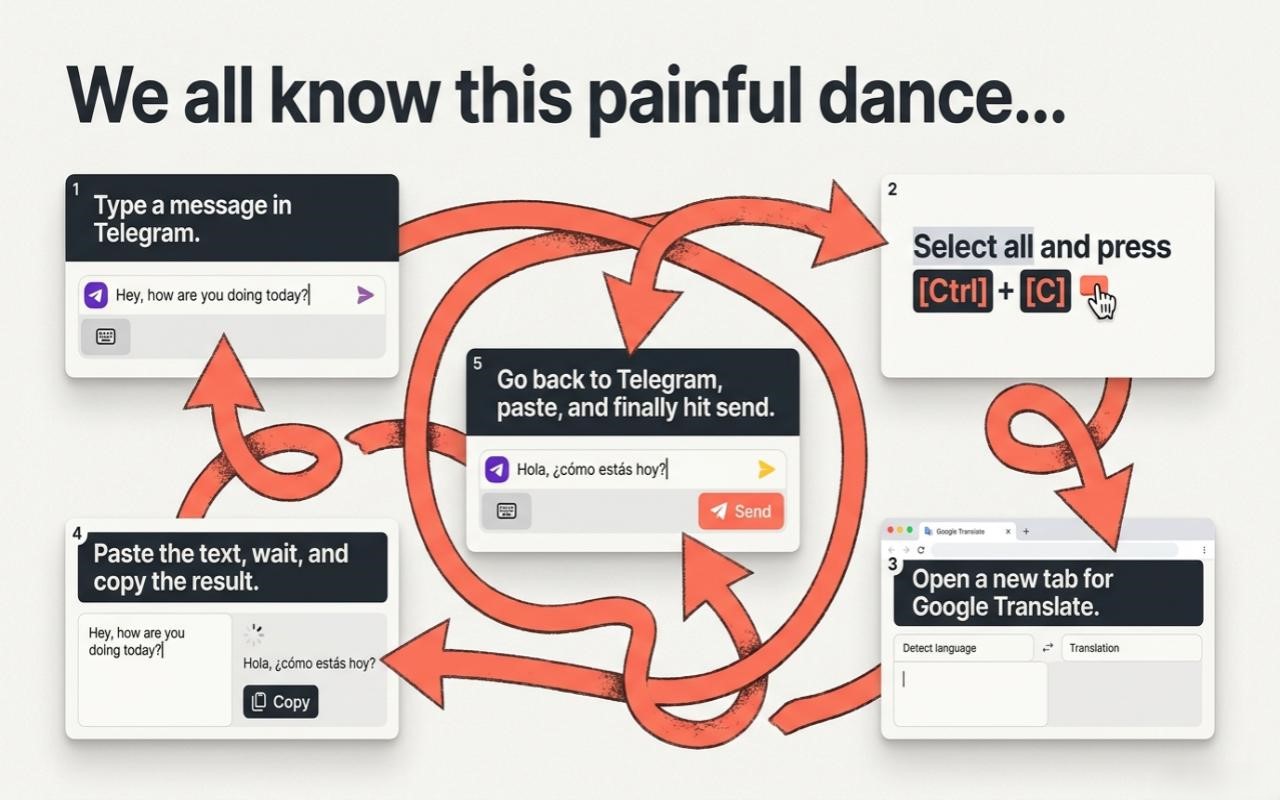
Unlike legacy translation services that force you to copy drafts, open another browser tab, paste text, copy the output, and navigate back, Babel operates directly within the browser's Document Object Model (DOM):

  1. Click into any text field, textarea, contenteditable box, or chat interface (Telegram Web, WhatsApp Web, Gmail, ChatGPT, Slack, Discord, Reddit).
  2. Type your thoughts in your native language naturally without worrying about foreign phrasing.
  3. Press Alt + T.
  4. Babel's 4-tier DOM injection engine swaps your draft with natural, context-aware translation in under 300 milliseconds.
  5. Cursor focus is preserved at the end of the line, allowing you to immediately hit Enter to send the message.
✍️ What is Proofreading mode (Alt + P) and how is it different from translation?

Alt + P is designed specifically for editorial polish in your current language:

  • Zero Language Conversion: It strictly preserves the source language (English remains English, Russian remains Russian, Spanish remains Spanish).
  • Comprehensive Correction: Corrects grammatical errors, typos, awkward comma placement, run-on sentences, and irregular capitalization.
  • Stylistic Consistency: Smoothes rough phrasing into clean, authoritative, and natural prose while retaining your authentic voice.
  • One-Stroke Replacement: Operates in-place within the same field with a single keystroke.
🔄 How does the Keyboard Layout Typo Fixer (Ctrl + Shift + F) work?

If you've ever typed an entire sentence only to realize your keyboard was in the wrong layout (e.g. ghbdtn? rfr ltkf& instead of привет, как дела?), Babel eliminates the need to delete and re-type:

  • Leave your cursor in the input field (or highlight the mistyped phrase) and press Ctrl + Shift + F.
  • Babel instantly swaps characters into the correct layout in approximately 1 millisecond.
  • 100% Offline: Operates locally via deterministic character mapping tables without sending network packets or consuming translation quota.
  • Wide Layout Support: Bi-directional QWERTY conversions for Russian (ЙЦУКЕН), Ukrainian, Belarusian, Kazakh, Kyrgyz, Tajik, Georgian, and Armenian.
⚙️ Can I customize and remap hotkeys if they conflict with a website?

Yes. If you frequently use web applications with reserved keyboard shortcuts (such as browser-based IDEs, Figma, or web terminals):

  1. Right-click the floating mascot and select "⚙️ Settings" (or open extension options via your browser toolbar).
  2. Scroll to the "Keyboard Shortcuts" section.
  3. Click into the target input box and press your desired shortcut combination (e.g., Alt + Shift + T or Ctrl + Alt + Space).
  4. Changes are stored in chrome.storage.local and applied immediately across all active tabs without restarting.
🐱 2. Interactive Mascot & Radial HUD Navigation 6 Guides
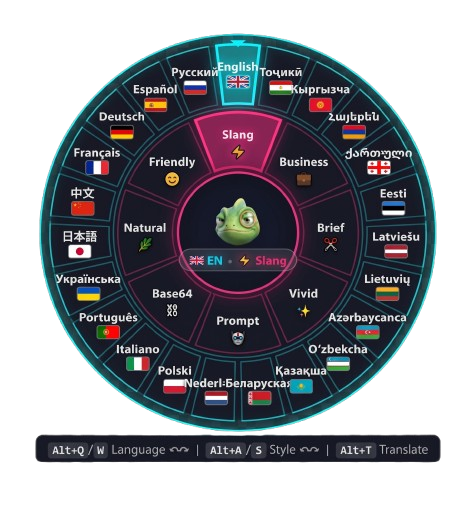
Babel Cyberpunk Radial HUD Menu Preview
Interface Architecture

Concentric Cyberpunk Radial HUD

Babel's floating companion features an isolated Shadow DOM interface with an outer Cyan Language Ring (23 languages with national flags) and an inner Magenta Tone Ring (8 conversation styles). Controlled seamlessly via hardware shortcuts, mouse wheel, or direct sector clicks.

Outer Ring 23 Target Languages Adaptive 360° sector slicing with flag markers · Alt+Q/W
Inner Ring 8 Conversation Tones Natural, Friendly, Slang, Business, Brief, Vivid, Prompt & Base64 · Alt+A/S
🛸 How do I move and position the floating Mascot on my screen?

The mascot is rendered inside an isolated Shadow DOM container to prevent host website CSS from interfering with its appearance:

  • Hardware-Locked Drag & Drop: Click and hold the mascot avatar with the left mouse button, then drag it freely to any corner, edge, or workspace zone on your screen.
  • Automatic Coordinate Sync: The exact screen coordinates are saved immediately to local extension storage. Whenever you navigate to new pages or relaunch the browser, the mascot stays right where you left it.
  • Non-Intrusive Presence: The mascot stays quietly in the background until hovered, clicked, or summoned via keyboard shortcuts.
📍 What should I do if the mascot gets pushed off-screen or lost?

If changing display resolutions or aggressive website layout shifts push the mascot off-screen:

  1. Right-click anywhere on the mascot (or right-click the central hub if HUD is visible).
  2. Select "📍 Reset Position" from the context menu.
  3. The mascot will smoothly animate back to its default bottom-right anchor and display a confirmation thought bubble: "Position reset 📍".
🎡 How do I navigate the two-ring Cyberpunk Radial HUD? 📸 Visual Diagram

As illustrated in the interactive preview above, left-clicking the mascot or pressing any rotation shortcut (Alt+Q/W/A/S) deploys the dual-ring radial HUD centered on the mascot:

  • Outer Ring (Neon Cyan): Controls Target Translation Languages. Features dynamic sector slicing based on your active favorites (from 3 languages up to all 23). Rotate with Alt + Q (↶) / Alt + W (↷), mouse wheel, or direct click.
  • Inner Ring (Neon Magenta): Controls Conversation Tones (Natural, Friendly, Slang, Business, Brief, Vivid, Prompt, Base64). Rotate with Alt + A (↶) / Alt + S (↷), mouse wheel, or direct click.
  • Hub Center: Shows the chameleon avatar and current status (e.g. 🇬🇧 EN • ⚡ Slang). Clicking the center or pressing Escape closes the menu instantly. It also auto-closes after 3.5 seconds of inactivity.
  • Bottom Hint Strip: Displays hardware key hints (Alt+Q/W Language, Alt+A/S Style, Alt+T Translate).
🙈 What is Stealth Mode and how do I hide the mascot completely?

For users who prefer a minimalist, completely clean web interface without floating overlays:

  1. Right-click the floating mascot avatar to open its glassmorphic context menu.
  2. Click "🙈 Hide Mascot".
  3. The mascot will show a quick farewell cloud and unmount from the DOM (display: none; pointer-events: none). It will never block web elements, chat send buttons, or scrollbars.
👁️ Do shortcuts still work in Stealth Mode, and how do I bring the mascot back?

Yes, 100% of Babel's functionality remains active in Stealth Mode:

  • Alt + T, Alt + P, and Ctrl + Shift + F continue translating and proofreading without interruption.
  • When a translation completes, the mascot briefly fades in for 2 seconds to show a confirmation thought bubble, then smoothly vanishes.
  • Restore Method 1 (Directly on Page): Press Alt + W to temporarily summon the HUD → click the "👁️ Show Mascot" button on the bottom HUD hint strip.
  • Restore Method 2 (Settings): Open Babel Settings → under "Mascot & HUD" switch Mascot Visibility back to "Always Show".
💭 What do the mascot's thought bubbles mean?

The thought bubble provides glanceable real-time feedback without modal interruptions:

  • "Translating to English..." — Active sub-300ms model inference in progress.
  • "Done! [English • Business]" — Translation replaced successfully with target language and tone confirmed.
  • 🌐 "Language: Deutsch" / 🌿 "Tone: Friendly" — Instant rotation status indicator.
  • 🔄 "Keyboard layout fixed!" — Offline layout conversion completed (Ctrl+Shift+F).
  • 📝 "Please select text first!" — Warns if Alt+T was pressed outside of an active input field or selection.
  • ❌ Clear error notifications with actionable recovery steps for network issues, quota limits, or DLP alerts.
✍️ 3. Translation, Tones & Text Integrity 5 Guides
🌐 How do I translate existing text on any website (Selection Translation)?

You can translate foreign messages, tweets, blog articles, and documentation in-place without opening separate translator tabs:

  1. Highlight any text passage on the page using your mouse cursor.
  2. Press Alt + U (or Alt + T).
  3. The highlighted segment transforms in-place into your target language with an indicator badge.
  4. Revert anytime: Press Escape or click anywhere on the page to instantly restore the original text.
🛡️ Does Selection Translation work on Shadow DOM web components (Reddit, YouTube)?

Yes. Traditional extensions fail on modern Web Components because text encapsulated inside shadow roots (#shadow-root) is hidden from standard DOM selection APIs:

  • Babel integrates an advanced Shadow DOM Piercing engine utilizing getComposedRanges() and composedPath() standards.
  • Accurately reads selections across Reddit post feeds, YouTube comments, Lit elements, and custom design systems.
  • Extracts pure text cleanly without capturing hidden template metadata or internal <slot> tags.
🎭 What 8 style tones are supported and when should I use each?

Babel gives you 8 tailored voice styles to match any communicative context:

  • 🌿 Natural: Fluid, contemporary native speaker phrasing. The default setting for daily browsing, forums, and friendly comments.
  • 😊 Friendly: Warm, upbeat, and encouraging tone with pleasant conversational manners.
  • ⚡ Slang: Authentic youth slang, colloquial contractions (gonna, tbh, fr), and modern vernacular for Discord and gaming.
  • 💼 Business: Formal corporate tone with polished vocabulary for client proposals, executive emails, and partner discussions.
  • ✂️ Brief: High-density executive summarization that condenses meaning with zero conversational fluff.
  • ✨ Vivid: Expressive, sensory, and evocative prose with rich descriptive vocabulary.
  • 🤖 Prompt: Specialized AI prompt engineering mode for Midjourney, Higgsfield, Flux, and Sora that injects camera lenses, cinematic lighting, and artistic direction. Beta
  • 🔒 Base64: 100% offline local Base64 string encoder/decoder with zero network calls.
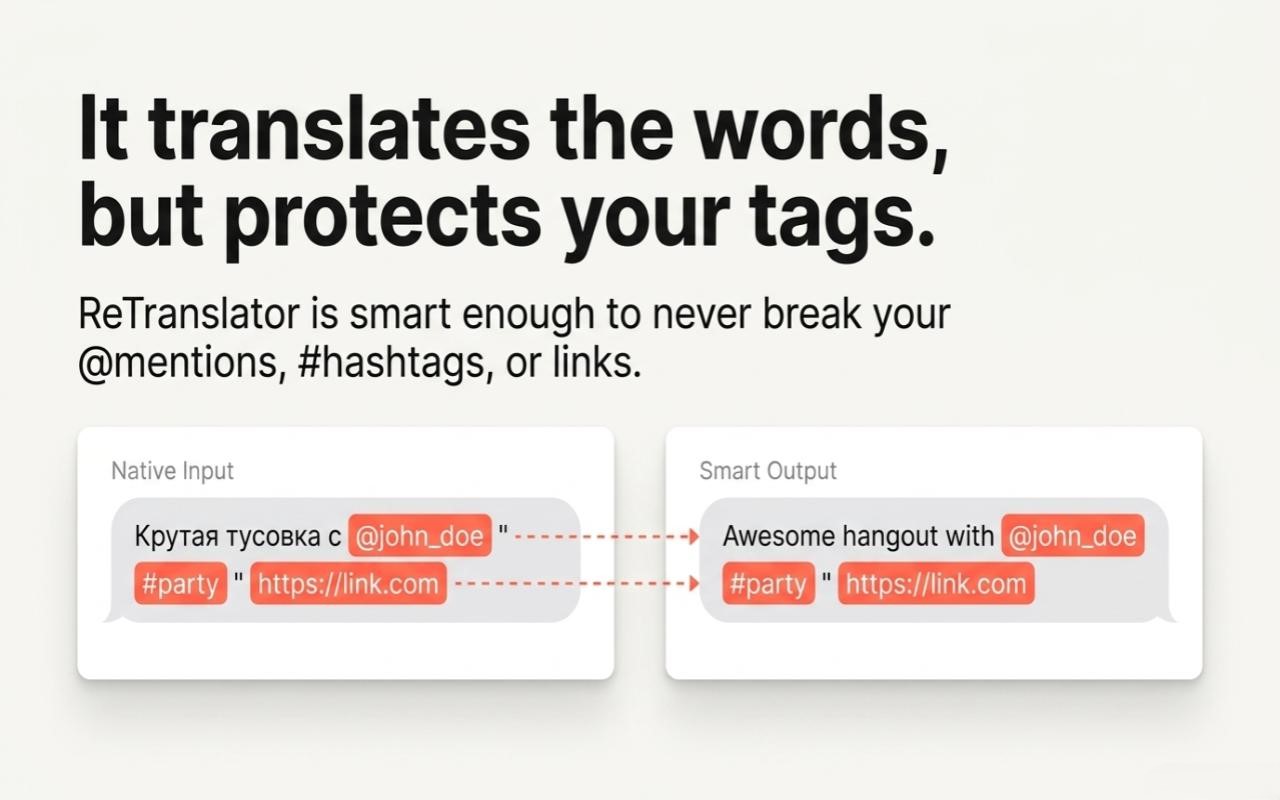
🏷️ How does Babel preserve @mentions, URLs, hashtags, and code variables?

Generic AI translation frequently translates or mangles usernames, web links, and code syntax. Babel avoids this through its pre-flight tokenization engine (mentions.js):

  • User Handles: @alex_dev, @durov and localized Cyrillic handles are isolated.
  • Web URLs: Hyperlinks (https://...) are masked and left untouched.
  • Hashtags: #startup, #crypto are fully preserved.
  • Code Variables: Placeholders like {userId}, %path%, and {{template}} remain unaltered.

After translation, all tokens are deterministically reconstituted back into their precise structural locations.

Why are long em-dashes (—) converted into spaced hyphens ( - )?

In digital chat applications (Telegram, Slack, WhatsApp), heavy typographic em-dashes () can look robotic and signal AI-generated text. Babel applies intelligent Dash Normalization:

  • Spaced em-dashes are converted into natural conversational hyphens with spaces ( - ).
  • Words accidentally joined by dashes are cleanly separated.
  • Dialogue dashes at the start of dialogue lines are preserved as standard punctuation.
🛡️ 4. Privacy, Security & Data Loss Prevention (DLP) 3 Guides
🔒 Does Babel store or log my translations and correspondence?

Never. Babel enforces a strict Zero Data Retention policy:

  • Requests are processed in volatile server RAM over encrypted TLS 1.3 connections exclusively for the lifespan of that specific inference call.
  • Drafts are never written to disk, never recorded in relational databases, and never used to train or fine-tune AI models.
  • Babel operates with zero-account privacy — you never need to connect personal social identities or email accounts.
🚨 What is client-side Data Loss Prevention (DLP) and how does it protect secrets?

Before any text packet leaves your browser, Babel's local DLP regex engine validates your text locally to prevent accidental leaks of credentials or financial data:

  • 🔑 API Keys & Tokens: Detects OpenAI (sk-...), Groq (gsk_...), GitHub (ghp_...), JWT tokens, and database credentials.
  • 💳 Credit Cards: Verifies 13–19 digit sequences using the Luhn checksum algorithm to intercept real card numbers while avoiding false positives on random digits.
  • 🛂 PII & Passwords: Flags sensitive credential markers.
  • Configurable Modes:
    • Strict (Default): Blocks the request completely, keeps your text in the input box, and alerts you via a thought bubble.
    • Mask: Automatically redacts the token (e.g. [CARD REDACTED]) and translates the safe remainder.
    • Off: Disables local checking (recommended only for local developer testing).
🌐 What is Domain Whitelisting and how do I restrict Babel to specific websites?

If your personal or corporate security guidelines require Babel to execute only on authorized portals:

  1. Open Babel Settings → enable "Domain Whitelist".
  2. Specify your approved domains (e.g. web.telegram.org, mail.google.com).
  3. On all non-whitelisted websites, Babel completely unmounts its content script and mascot, ensuring zero code execution.
💼 5. Plans, Licences & Troubleshooting 3 Guides
💳 How do Free vs. Pro tiers compare and how do I activate my Lava.top or Gumroad license key?

Babel offers a transparent capability model for every workflow:

  • Free Tier: 20 daily translation units, 300 maximum characters per request, 7 core styles, zero registration required.
  • Pro Tiers (Monthly / Monthly Power): 200 to 800 daily translations, 3,000-character allowance (handles full emails and articles), AI Prompt Mode, priority cloud queue, and activation on up to 3 personal devices.
  • Activation Steps:
    1. Open Babel Settings → click the "Account / Plan" tab.
    2. Paste your license key received from Lava.top or Gumroad into the license field.
    3. Click "Activate". The extension verifies the license key with the server and instantly unlocks all Pro capabilities.
💻 What if I reinstall my operating system, switch browsers, or change computers?

A single Pro license includes 3 simultaneous device seats (e.g. desktop PC, work laptop, and secondary browser):

  • Each browser installation generates an anonymous, hardware-bound Device ID.
  • If you format your computer, switch to a new machine, or re-install your OS, open Babel Settings → Account tab → click "Reset Device Bindings" to release older slots and register your current device.
🔧 Troubleshooting: What should I check if pressing Alt + T does not translate?

Run through this quick 6-step checklist:

  1. Reload the Tab (F5): If the tab was open prior to installing or updating the extension, the browser has not yet injected the Babel content script.
  2. Check Cursor Focus: Ensure your typing cursor is actively blinking inside the target text box or textarea.
  3. Look at the Mascot Thought Bubble: If you exceeded the 300-char free limit or daily quota, the bubble will state the exact issue.
  4. Check Domain Whitelist: In Babel Settings, ensure the current domain is not blocked by an active whitelist.
  5. Canvas & Custom Editors: In non-standard editors (such as Google Docs canvas or custom WebGL inputs), highlight the text with your mouse and press Alt + T to invoke Selection Translation.
  6. Test Connection: In Babel Settings, click "Test Connection" to verify server connectivity with our Fly.io cloud gateway.

Project News & Release Notes

Live Dispatch v1.10.8 Latest

Official releases, browser store milestones, newly integrated generative studios, security bulletins, and technical evolutions of the Babel project.

🎨 AI Prompt Engine v1.10.8

AI Prompt Engineering Engine: Cinematic Image & Video Presets

Elevate raw ideas into structured, high-detail cinematic prompts tailored specifically for creative generative studios directly inside the generator prompt box:

  • Target Studio Presets: Pre-configured compiler rules for Midjourney (aspect flags --ar 16:9 --v 6.0), Higgsfield AI video mechanics, and Google FLOW (Veo / Gemini Omni) with Image and Video presets.
  • LoRA & Diffusion Support: Fine-grained control for Flux and Civitai models (<lora:detail:0.8>) plus negative prompt weighting.
  • Smart Host Detection: Extension automatically detects host studio domains to engage model-specific prompt schemas.
#PromptEngine #Midjourney #Higgsfield #GoogleFLOW #Flux
Explore Prompt Mode ↓
⚡ Productivity v1.10.8

Offline Keyboard Layout Fixer (1ms) & 8 Adaptive Speech Tones

Two high-frequency productivity superpowers built directly into your everyday keyboard flow:

  • ⌨️ Offline Keyboard Layout Fixer (Ctrl + Shift + F): Typed in the wrong keyboard layout (e.g. «ghbdtn» ↔ «привет»)? Instantly fix it 100% offline in 1ms without consuming quota.
  • 🎭 8 Adaptive Speech Tones: Effortlessly switch voice: Natural, Friendly, Internet Slang, Professional Business, Brief, Vivid, Prompt Mode, and 100% offline Base64.
#LayoutFixer #Offline1ms #8Tones #ZeroQuota
Read Tone & Hotkey Guides ↓
🛡️ Zero-Log DLP v1.10.8

Strict Zero-Log Privacy, Built-In DLP & Domain Whitelist

Your privacy is non-negotiable. Babel does not track keystrokes, does not retain chat logs, and operates exclusively over encrypted TLS 1.3 channels:

  • Client-Side DLP Shield: Local Data Loss Prevention automatically masks passwords, API keys, session tokens, and credit card numbers before transmission. Zero data retention — your text is never stored or used for training.
  • Domain Whitelist: Restrict extension activation exclusively to chosen websites if desired (e.g. only on work domains).
  • Transparent Capacity Tiers: Generous Free allowance, unlimited Monthly / Monthly Power subscriptions, and non-expiring on-demand Boost Packs.
#ZeroLog #ClientDLP #DomainWhitelist #TLS13
View Security & Plans ↓
🌐 Multi-Browser Store Status

Chrome Web Store Live — Brave & Arc Verified, Edge & Opera in Review

Babel is expanding its browser footprint across the global Chromium developer and user community:

  • Google Chrome, Brave & Arc: Live and verified on Chrome Web Store with 1-click install and seamless hotkey performance.
  • Microsoft Edge & Opera: Submissions are in final review and scheduled for activation as soon as catalog approvals complete.
  • Expanding Video Studio Roadmaps: Fine-tuned heuristics actively in training for Runway Gen-3, Luma Dream Machine, OpenAI Sora, and Kling AI.
#ChromeWebStore #Brave #Arc #EdgeAddons #Opera
Chrome Web Store Listing ↗

Babel Support & Feedback

Direct Developer Channel

Babel operates with zero-account privacy. To identify your instance or support ticket, please provide your Account ID (from the Babel extension popup or Options page).

🔑 Account ID: Found inside Babel popup or Options page (a1b2c3d4-e5f6-4a7b-8c9d-0e1f2a3b4c5d)
Contact email for developer response and resolution updates.
Or contact directly